


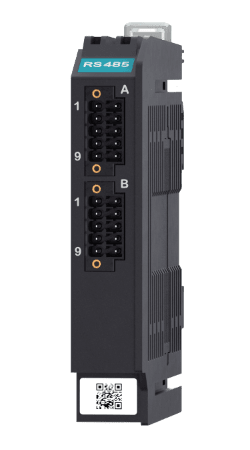
Zora-3 RS485 Module
Serial interface module connecting up to four RS485 or NMEA 0183 devices to the Zora-3 Main Unit, including supported Modbus instruments.
Request a quote with no obligation to buy.
Delivery and final amount: to be quoted.
VAT-inclusive amounts are shown for Croatia. Price, tax treatment and delivery for your destination will be confirmed in the offer.
Product details
Description
Connect up to four RS485 or NMEA 0183 devices to your Zora-3 system with a single, compact module. The Zora-3 RS485 Module gives you the flexibility to integrate Modbus instruments, legacy sensors, and other serial devices — all powered directly by the Main Unit with no external supply required.
Want to go deeper?
Explore all the details in our guide →
Technical data
- Manufacturer / brand
- iNav4U
- Supplier product code
- INV-Z3-485
- Compatibility
- Zora-3 Main Unit
- Serial interfaces
- Up to 4 RS485 or NMEA 0183 devices
- Listed protocols
- RS485; NMEA 0183; Modbus
- Power source
- Zora-3 Main Unit; no separate external supply
- Module designation in guide
- IFM-RS485
- Transceiver
- MAX13488E
- Communication mode
- 4 half-duplex RS485 ports
- Galvanic isolation
- 2 blocks of 2 ports; isolated from each other and the main system
- Programmable data rate in guide
- Up to 4 Mbit/s
- Termination
- Selectable 120 Ω per port according to the guide
- Stacking restriction
- Up to 3 modules from the IFM-RS485 / IFM-RS232 / IFM-MESH group
- Mounting
- DIN rail EN 50022
- Housing material
- ABS/PC
- Dimensions H × W × D in guide
- 110 × 20 × 95 mm
- Module weight in guide
- 110 g
- Signal connectors
- A and B: 10 pins each, 3.5 mm pitch; AWG 16–26
- Operating temperature
- −30 to +70 °C
- Storage temperature
- −40 to +85 °C
Installation & compatibility
What is included
Exact supplied items are confirmed for the chosen model in your quotation. Refer to the description and model documents for published package details.
Additional components to check
Power connection, marine network cables and gateways, display or client device, and any required software licences.
These are planning checks for the complete system. Some components may already be included or installed on your vessel.
Compatibility checks
Supported protocols, equipment models, network interfaces, software/licence requirements and the chosen display or device.
Check the exact model specifications and manufacturer instructions before selecting components.
Installation support
UnLucky can help assess the installation and prepare a proposal. Send the product/model reference, vessel make and model, location, photos of the installation area and details of existing equipment.
Service scope, availability and installation costs are confirmed in the quotation.
Discuss your installation